Selenium
tldr; Instead of using mouse and keyboard to control browser, you call a Selenium function.
Selenium is a software project that allows you to automate web applications using various browsers
Components of Selenium
ELI5 description
- Web Driver - jar file with bunch of classes to automate browser
- Selenium IDE - records actions you perform on browser and creates an automation script
- Selenium Grid - Run tests remotely

Selenium IDE hands on
[!NOTE] Scripts created by this plugin is pretty terrible Not necessarily because it's bad engineering It's genuinely a hard problem
- Download and install the Selenium IDE (4MB)
- Create a new project
- Start a new recording with https://demoqa.com/text-box
- Export the recorded script to a Java JUnit file
[!NOTE] Generated code is using JUnit 4
Selenium Web Driver hands on
Pre-requisites
- Java 21
- Gradle 8
- Firefox
- VSCode with Extension Pack for Java (or any other Java IDE)
Simple Selenium Demo
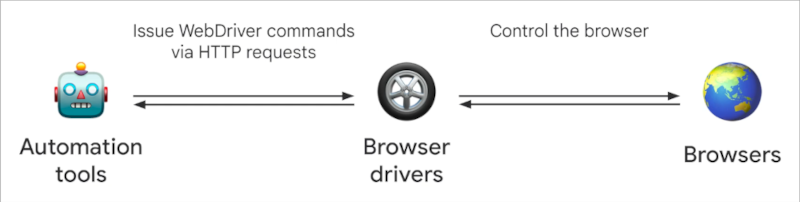
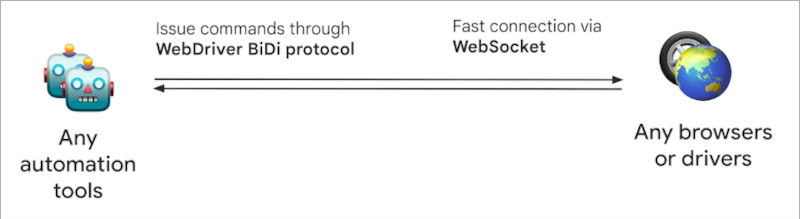
Webdriver classic, WebDriver BiDi
Dec 21, 2024 9:12:29 AM org.openqa.selenium.firefox.FirefoxDriver <init>
WARNING: CDP support for Firefox is deprecated and will be removed in future versions. Please switch to WebDriver BiDi.
WebDriver classic architecture
WebDriver BiDi architecture
Enable BiDi
Chrome
var options = new ChromeOptions();
options.setCapability("webSocketUrl", true);
browser = new ChromeDriver(options);
Firefox
var options = new FirefoxOptions();
options.setCapability("webSocketUrl", true);
browser = new FirefoxDriver(options);
Remove extensions
[!NOTE] While most Selenium commands are included in the specification, some things are browser specific
On Chrome
var options = new ChromeOptions();
options.addArguments("--disable-extensions");
browser = new ChromeDriver(options);
On Firefox
var options = new FirefoxOptions();
options.addArguments("--safe-mode");
browser = new FirefoxDriver(options);
[!NOTE] --safe-mode flag in Firefox disables multiple features including extensions Such as Hardware Acceleration & Themes etc
Common Exceptions
ELI5 description;
NoSuchElementException- Element you are looking for is not in the webpage. If selector is correct, see if it's inside an iframeStaleElementReferenceException- Element was there but not right nowElementClickInterceptedException- Popup probably covering the element or not in the view
[!TIP] Looking for info? Search in documentation first Then try GPTing it or try Stackoverflow
Page object model design pattern
Why page object model
- Re-usability
- Ease of maintenance
- Better readability and clarity
- Create pages from form and form output
public class Page {
  private WebDriver browser;

  @FindBy(id = "identifier")
  private WebElement elementName;

  Page(WebDriver browser) {
    this.browser = browser;
    PageFactory.initElements(browser, this);
  }

  public void doSomething(String value) {
    this.elementName.sendKeys(value);
  }
}
Headless mode
Chrome
var options = new ChromeOptions();
options.addArguments("--headless=new");
browser = new ChromeDriver(options);
Firefox
var options = new FirefoxOptions();
options.addArguments("--headless");
browser = new FirefoxDriver(options);